Paying with your phone in the Maldives: banking apps, Favara, DhiraaguPay and m-Faisaa
How cashless payments work in the Maldives: the BML app and other bank apps, Favara instant transfers by phone number, QR payments, DhiraaguPay and Ooredoo m-Faisaa wallets, paying bills and government fees, and staying safe.
Quick answer
- Most Maldivians pay each other and many shops by bank transfer in their banking app.
- Favara, the central bank's instant payment system launched in 2023, lets you send money instantly between participating banks, often using a phone number or ID instead of an account number.
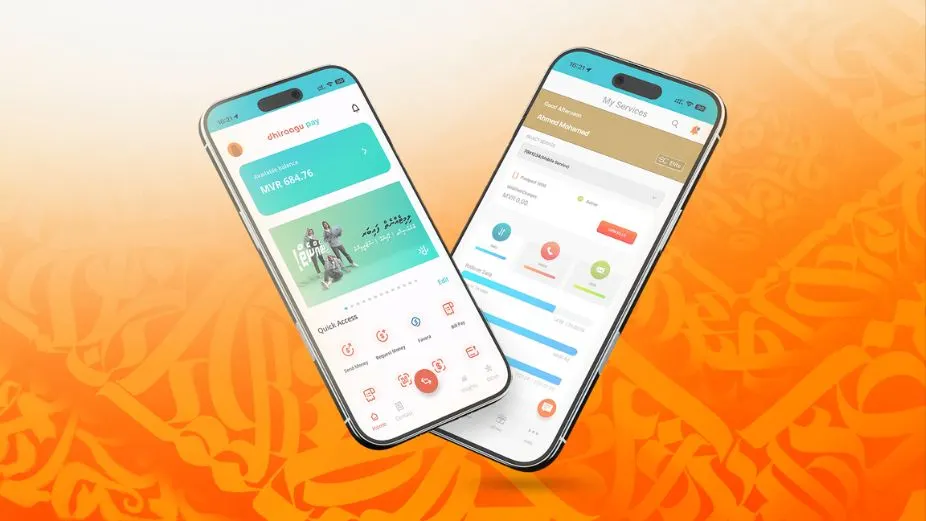
- DhiraaguPay and Ooredoo m-Faisaa are mobile wallets for transfers, bills and merchant payments, open to customers on any local network.
- Government fees and taxes can be paid online, including through wallets on MIRA and government payment portals.
The Maldives has moved quickly towards cashless payments. In Malé and Hulhumalé, people split restaurant bills by bank transfer, pay small shops by scanning a QR code, top up phones and pay electricity bills in apps. For newcomers, the local systems can be confusing at first. This guide explains the main options and how to use them safely.
Bank apps: the everyday way to pay
For most residents, the bank's mobile app is the main payment tool. Bank of Maldives (BML), the largest bank, introduced the country's first mobile banking app in 2015, and other banks, including Maldives Islamic Bank, offer their own apps. Typical features:
- Transfers to other accounts at the same bank or other banks.
- Bill payments for electricity, water, phone and internet.
- Phone top-ups.
- QR payments at shops that display a payment QR code.
- Card controls: freezing cards and setting limits.
BML's app includes a wallet with contactless and "scan to pay" features, and the bank added two-factor authentication for logins. You normally need to be registered for internet banking before using the mobile app. See opening a bank account.
Favara: instant transfers by phone number
Favara is the instant payment system built by the Maldives Monetary Authority (MMA) and launched in August 2023. It allows customers of participating banks to send money to each other instantly, around the clock. Launch participants included BML, Maldives Islamic Bank and the State Bank of India, with more banks joining later.
Key features:
- Favara ID (smart addressing): you can pay someone using an identifier such as their mobile number, email address or national ID, instead of their account number.
- Instant transfers between participating banks.
- Payment requests: you can request money from someone, who approves it in their app.
- Account verification: you can see the account holder's name before sending, which reduces mistakes.
At launch, single transfers were capped at MVR 50,000 and payment requests at MVR 5,000. Within its first year, Favara processed millions of transactions. Look for Favara options in your bank app, and register your Favara ID.
Mobile wallets
DhiraaguPay
DhiraaguPay is the mobile money service of Dhiraagu, now run by its fintech subsidiary. It offers peer-to-peer transfers, Favara transfers, bill payments, merchant payments, sub-wallets and spending insights. It is available to customers on any local network, not only Dhiraagu subscribers. Many shops, restaurants, salons and clinics accept it, and it can be used for some government payments through MIRA.
Ooredoo m-Faisaa
m-Faisaa is Ooredoo Maldives' digital wallet, run by its fintech subsidiary. It supports deposits, withdrawals, transfers, merchant payments and utility bills. You can top it up from accounts at banks including BML, State Bank of India and Maldives Islamic Bank. It has been added as a payment option on government payment portals, and in 2025 Ooredoo's fintech arm received a licence to handle inward remittances, allowing people to receive money from abroad into m-Faisaa.
Wallets usually require registration with identification, and account limits depend on how fully you've verified your identity.
Paying government fees and taxes
Many government payments can be made online:
- MIRA (taxes): MIRA's online payment options include bank payments and mobile wallets. See registering with MIRA.
- Government services: the government's payment portal accepts various methods for fees.
- Transport fees, such as vehicle registration, can often be paid online.
Cards
Local debit and credit cards work at card terminals in larger shops, supermarkets, restaurants and hotels. Contactless payment is common in Greater Malé. Using a rufiyaa card for payments in foreign currency, such as online shopping from abroad, is subject to limits because of the dollar shortage. See the dollar shortage explained.
Tips for newcomers
- Open a local account early: once you have your work visa, a local account makes daily life much easier.
- Register your Favara ID so friends and colleagues can pay you with your phone number.
- Save receipts: many shops accept a screenshot of your transfer as proof. Keep them until the transaction is confirmed.
- Keep some cash for ferries, small shops on islands and places without terminals.
For small businesses
Accepting app payments is easy and cheap for small businesses: display your account details or a payment QR code, and check transfers before handing over goods. As you grow, consider card terminals and online payment gateways from your bank. See business bank accounts and online businesses.
Staying safe
- Never share OTP codes, passwords or PINs, even with someone claiming to be from your bank.
- Check the recipient name shown before confirming a transfer.
- Beware of fake payment screenshots: if you're selling, confirm the money has arrived in your account before handing over goods.
- Watch for scams via Viber, WhatsApp or social media asking you to "verify" your account.
- Use app security: enable biometrics and two-factor authentication, and keep your app updated.
- Report problems quickly to your bank if you send money to the wrong person or suspect fraud.
Getting started step by step
- Open a bank account with your passport and visa (or ID card for Maldivians).
- Register for internet banking at the branch or online, then download your bank's app and log in.
- Set up security: create a strong password, enable biometric login and two-factor authentication.
- Register your Favara ID, such as your mobile number, so people can pay you easily.
- Add billers for electricity, water, phone and internet, so monthly payments take seconds.
- Optionally register a wallet such as DhiraaguPay or m-Faisaa if you want wallet features or use merchants that prefer them.
Splitting bills and paying friends
Splitting a restaurant bill by transfer is normal in Malé. One person pays the bill, and the others transfer their share using the person's phone number or account. Payment requests through Favara make this even easier: the payer sends a request, and friends approve it in their apps. DhiraaguPay also offers bill-splitting features.
When things go wrong
- Money sent to the wrong person: contact your bank immediately with the transaction details. Banks can try to recover it, but success depends on the recipient's cooperation, so always check the name before sending.
- Transfer not received: instant transfers usually arrive in seconds; if not, check with your bank before sending again.
- Lost phone: contact your bank to block app access and your mobile operator to block the SIM. Change passwords once you have a new phone.
For visitors
Tourists don't usually need local apps or wallets. International cards work at resorts, many guesthouses and larger shops in Malé, and US dollars are widely accepted in tourism businesses. Carry some rufiyaa for ferries and small local shops. See money for visitors.
Common questions
What is Favara in the Maldives?
Favara is the Maldives Monetary Authority's instant payment system, launched in 2023. It lets customers of participating banks send money instantly to each other, using identifiers such as a mobile number, email or national ID instead of an account number.
Can tourists use DhiraaguPay or m-Faisaa?
These wallets are mainly designed for residents and usually require registration with local identification. Most tourists use international cards and cash instead.
How do I pay a shop by bank transfer in the Maldives?
Ask for the shop's account details or scan its QR code in your banking app, transfer the amount and show the confirmation. Many small businesses accept this.
Is there a limit on Favara transfers?
At launch, single Favara transfers were capped at MVR 50,000 and payment requests at MVR 5,000. Limits may change, and your bank may set its own.
Can I pay MIRA taxes online?
Yes. MIRA offers online payment options, including bank payments and mobile wallets through its payment gateway. Check MIRA's website for the methods currently available.
Do I need a local SIM card to use banking apps?
Usually yes. Banks and wallets send verification codes by SMS and link your account to a Maldivian mobile number, so get a local SIM soon after arrival.
Official sources
- Maldives Monetary Authority: Favara
- Maldives Financial Review: MMA launches Favara
- Bank of Maldives: Mobile banking
- Dhiraagu: DhiraaguPay
- Ooredoo Maldives: m-Faisaa
Last reviewed 27 November 2026. This guide is general information, not legal or financial advice. Rules change, so confirm with the official source before you apply. Report an error
Related guides
From our network
Maldives Investments
Apartments, houses and land for sale and rent in Malé, Hulhumalé and across the Maldives, with prices.
Browse property listings ↗maldivesinvestments.com is run by the same team as HandyMaldives.