
Blog
Dyson V11 Pulsing or Cutting Out? 6 Easy Fixes for Your Vacuum

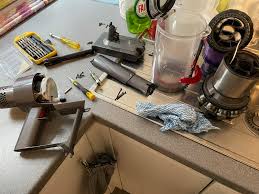
Dyson V11 Pulsing or Cutting Out? How to Fix Your Vacuum in Minutes
You’ve invested in a premium cleaning machine, but now your Dyson V11 is pulsing—making a “vroom-vroom” sound—and cutting out every few seconds. It’s a common frustration for owners of the V10, V11, and V15 series. While it may feel like your expensive vacuum has died, this pulsing sound is actually a clever safety feature designed to protect the motor from overheating.
In this guide, we will explain exactly why your Dyson is pulsing, how to clear blockages, the right way to maintain your filters, and when it’s time to replace the battery. By the end of this article, you’ll likely have your Dyson running like new without having to spend a fortune at a repair shop.
Why is My Dyson Pulsing? Understanding the Safety Logic
Unlike cheaper vacuums that simply lose suction and keep running until the motor burns out, Dyson cordless vacuums are programmed with a “pulsing” logic. If the internal sensors detect a restriction in airflow, the machine will pulsate the motor power. This is the vacuum’s way of saying: “I can’t breathe!”
The pulsing is almost always caused by one of three things: a blockage in the airways, a dirty filter, or a failing battery. Let’s go through the troubleshooting steps in order of easiest to hardest.
1. The “Airway Blocked” Message and Visual Inspection
If you have a Dyson V11 or V15, the LCD screen will likely show an “Airway Blocked” animation. This is your first clue. To find the blockage, you need to check the vacuum “pathway” from front to back.
Step-by-Step Blockage Check:
- Check the Cleaner Head: Turn the vacuum over and look at the brush bar. Hair, string, or large debris can get wrapped around the bar, preventing it from spinning and choking the airflow.
- Inspect the Wand: Remove the long wand from the main body. Drop a coin or a small ball through it. If the coin doesn’t fall out the other end, you have a clog (likely a clump of pet hair or a stray sock).
- Check the “Inlet” (The “U” bend): Where the wand connects to the bin, there is a small flap. Use a flashlight to see if anything is stuck in that narrow opening.
2. Washing and Drying the Filter (The Most Common Fix)
The #1 reason for a Dyson V11 pulsing is a clogged HEPA filter. Even if the filter looks clean on the outside, microscopic dust particles (like drywall dust or flour) can clog the internal fibers.
How to Properly Wash Your Dyson Filter:
- Twist the filter counter-clockwise to remove it from the back of the motor.
- Tap the filter gently over a trash can to remove loose dust.
- Rinse the filter under cold tap water only. Do not use soap or detergents.
- Fill the filter with water, cover the ends with your hands, and shake it to dislodge trapped dirt.
- CRITICAL: Let the filter dry for at least 24 to 48 hours. Never put a damp filter back into a Dyson, as it can suck water into the motor and destroy the vacuum.
Pro Tip: Many Dyson owners keep a “spare” filter on hand so they can continue cleaning while the other filter is drying.
3. The Bin and Cyclone Assembly
If you have cleared the wand and washed the filter but the pulsing continues, the issue might be inside the cyclone assembly. Over time, fine dust can build up in the “shroud” (the mesh screen inside the clear bin).
Remove the clear bin entirely by pressing the red release button. Use a damp cloth to wipe the shroud and use a can of compressed air to blow out the tiny holes in the cyclone. If these holes are blocked, the motor will pulse because it cannot pull air through the cyclones efficiently.
4. Battery Issues: When the Pulse Means “Low Power”
If your Dyson V11 pulses specifically when you are in “Boost” or “Max” mode, but works fine in “Eco” mode, your battery is likely failing. Cordless vacuum batteries have a lifespan of about 2 to 4 years. As they age, they can no longer provide the high voltage required for the most powerful suction modes.
The Battery Test: Fully charge your vacuum. Switch it to Boost mode and pull the trigger. If it pulses and then shuts off, or if the LCD screen shows a “red light” or a “battery low” warning immediately, you need a replacement battery.
5. The “Broken Trigger” Fault (V10 and V11 Models)
The Dyson V10 and early V11 models have a known design flaw: the internal plastic trigger can snap. If your vacuum feels “mushy” when you pull the trigger, or if you have to hold it “just right” to keep it running, the trigger assembly is failing. This isn’t technically pulsing, but it causes the vacuum to cut in and out.
Dyson Repair and Parts Cost Breakdown
Dyson parts are premium-priced, but they are generally easy to install yourself. Here is what you can expect to pay for common fixes.
| Part / Service | Estimated Part Cost | Difficulty Level |
|---|---|---|
| Replacement HEPA Filter | $20 – $40 | Very Easy |
| $95 – $150 | Easy (Screw-in or Click-in) | |
| Genuine Motorhead/Brush Bar | $80 – $120 | Easy |
| Main Body/Motor Assembly | $150 – $250 | Moderate |
| Professional Service/Tune-up | $100+ | N/A |
Is it worth it? If your V11 motor is still strong but the battery is dead, spending $100 on a battery is much smarter than spending $700 on a new V15 or Gen5Detect. However, if the motor itself is making a grinding noise, a replacement might be more logical.
How to Extend the Life of Your Dyson
Avoid the “Dyson pulsing” nightmare by following these three maintenance rules:
- Don’t use Max Mode for everything: Max/Boost mode generates massive heat, which degrades the battery faster. Use “Auto” or “Eco” mode for hard floors.
- Empty the bin at the “MAX” line: If you let the bin overfill, dirt gets pushed up into the cyclones and filter, causing immediate blockages.
- Check the brush bar weekly: Removing tangled hair prevents the motorhead from straining, which saves battery life.
Frequently Asked Questions (FAQ)
Can I use my Dyson without the filter?
No! Never run your Dyson without the filter. It will allow dust to enter the high-speed digital motor, which will cause it to seize up and permanently break the machine.
Why is my Dyson battery dying so fast?
If you primarily use Boost mode, you will only get about 5-8 minutes of runtime. Additionally, leaving the vacuum in a very hot or very cold area (like a garage) can permanently reduce battery capacity.
My Dyson screen says “Filter not sealed”—what do I do?
This means the filter is not twisted on all the way. Ensure the icons on the filter align perfectly with the icons on the motor body. If the seal is loose, the vacuum will pulse to prevent dust from escaping.
Conclusion
A Dyson V11 pulsing or cutting out is usually a cry for help rather than a sign of a dead vacuum. In 90% of cases, a thorough washing of the filter and a quick check for blockages in the wand or cleaner head will solve the problem in minutes.
By understanding the safety features of your Dyson and performing regular maintenance, you can ensure your vacuum remains the most powerful tool in your cleaning arsenal. If your battery has finally reached the end of its life, don’t be afraid to invest in a genuine replacement—it’s a small price to pay to keep your premium machine running for several more years.